Kortex Alternative for NotebookLM: Honest Comparison
Short answer: NotebookBloom is the best Kortex alternative if you want NotebookLM (Gemini Notebook) enhanced for research specifically — real citation export (APA/MLA/Chicago/ BibTeX), a Zotero bridge, Anki export with sources, and cross-notebook search — at $2.99/month or $29/year with a real free plan and minimal permissions. Pick Kortex instead if you want a full standalone second-brain workspace and its price and access scope are fine with you.
If you've searched for a NotebookLM extension, you've run into Kortex. It's the best-known one, it does a lot, and it's also the most expensive — and when I looked closely at what it asks for in return, I decided to build the thing I actually wanted instead. This is an honest comparison, from someone who is obviously not neutral. I'll tell you where Kortex is the better pick, too.
Quick naming note first: NotebookLM became Gemini Notebook in July 2026. Same app. Every extension here, mine and Kortex included, works with both names.
The three things that made me look elsewhere
1. Price
Kortex sits at the premium end — the kind of price that makes sense if you're all-in on it as a full workspace, and doesn't if you just want NotebookLM to export citations and flashcards. I wanted the second thing, at a price that matched. NotebookBloom is $2.99/month or $29/year, with a free plan that isn't a crippled trial.
2. Permissions
This is the one that actually bothered me. A lot of powerful extensions ask for broad "read and change all your data on the websites you visit" access. That's a big blast radius for a tool that lives on top of your research. NotebookBloom uses only your own Google Drive (drive.file) for optional sync — the scope where it can only see files it created, not your whole Drive, and not every site you open. Check the permissions on anything you install here, mine included. You should know what you're granting.
3. The academic features nobody else finishes
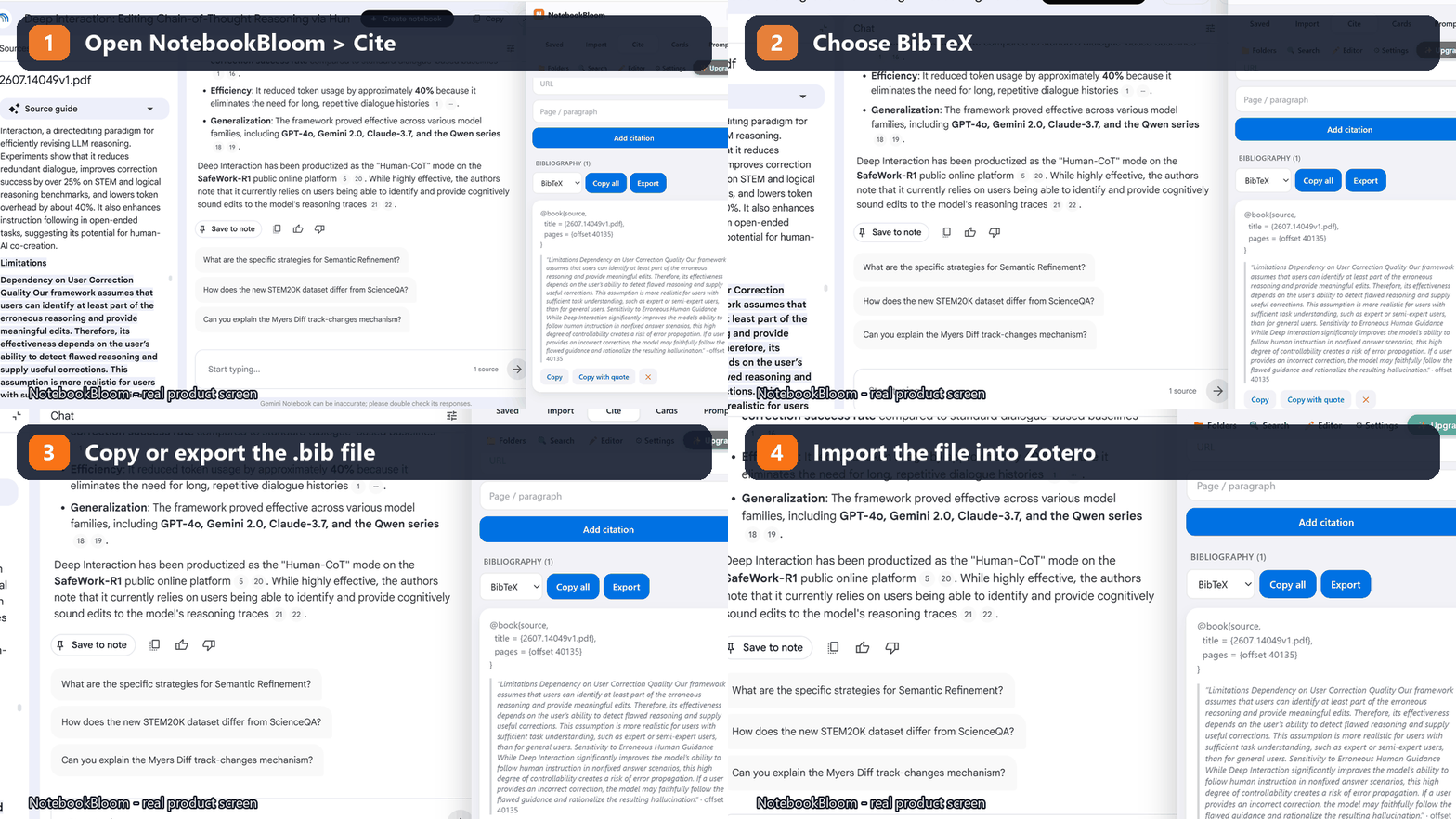
Most NotebookLM extensions do imports and organization. Very few do the thing researchers actually need at the end: real citations. As of 2026, no other extension exports NotebookLM sources to proper APA / MLA / Chicago / BibTeX — or bridges them into Zotero. That gap is the whole reason NotebookBloom exists.
Feature-by-feature, plainly
- Citation export (APA/MLA/Chicago/BibTeX): NotebookBloom does it; most alternatives, including the obvious ones, don't. This is the moat.
- Zotero / Mendeley: NotebookBloom exports BibTeX that imports cleanly. See the Zotero guide.
- Anki flashcard export with sources: NotebookBloom does .apkg / TSV / AnkiConnect, with the source on the back of every card. Guide here.
- Cross-notebook search: NotebookBloom searches every notebook, source and prompt at once. Guide here.
- Bulk import (playlists/channels/RSS) + folders: both NotebookBloom and Kortex handle importing and organizing well — this is table stakes at the top end.
- Export to Markdown / PDF / HTML: NotebookBloom does all three, editable-first.
Where Kortex is the better choice
I'm not going to pretend otherwise. If you want a full second-brain workspace — a place to write, connect notes, and run your whole knowledge system, not just enhance NotebookLM — Kortex is built for that and NotebookBloom isn't. NotebookBloom is deliberately narrower: it makes NotebookLM a betterresearch tool, and stops there. If your center of gravity is a standalone note app, Kortex (or something like Obsidian) is the right home.
Try it without deciding anything
The free plan is real — folders, tags, prompts, cross-notebook search, exports, and a manual citation builder, no card required. Install it, keep Kortex if you have it, and see which one you actually open. That's the only comparison that counts.
FAQ
What's the best Kortex alternative for NotebookLM?
If you want NotebookLM (Gemini Notebook) enhanced for research specifically — real citation export, Zotero/BibTeX, Anki with sources, cross-notebook search — NotebookBloom is a strong, cheaper alternative at $2.99/month or $29/year with a real free plan. Kortex is the better pick if you want a full standalone second-brain workspace.
How much does NotebookBloom cost vs Kortex?
NotebookBloom is $2.99/month or $29/year, with a free plan that includes folders, tags, prompts, cross-notebook search, exports and a manual citation builder. Kortex sits at the premium end — worth it if you're all-in on it as a full workspace, less so if you just want NotebookLM to export citations and flashcards.
What can NotebookBloom do that other NotebookLM extensions can't?
Real citation export (APA/MLA/Chicago/BibTeX), a Zotero/Mendeley bridge, and Anki flashcard export with the source on every card. As of 2026, most extensions do imports and organization but skip these academic features — that gap is why NotebookBloom exists.
What permissions does NotebookBloom need?
Only your own Google Drive (drive.file) for optional sync — a scope where it can only see files it created, not your whole Drive and not every site you visit. Many powerful extensions ask for broad "read and change all your data" access; NotebookBloom deliberately doesn't.
When is Kortex the better choice?
If your center of gravity is a standalone note app — a place to write, connect notes and run your whole knowledge system — Kortex is built for that and NotebookBloom isn't. NotebookBloom is deliberately narrower: it makes NotebookLM a better research tool and stops there.
Official references
Product behavior can change. These official pages are the reference points used for this guide.
NotebookBloom is an independent extension and is not affiliated with Google. NotebookLM and Gemini Notebook are names for the same Google product; NotebookLM is a trademark of Google LLC.